

SnmpSoft Syslog Watcher (Current version 4.8.6) is a log collection and notification software for network devices. It allows Network and System Administrators to store logs in one central location, and parse through a multitude of entries with ease. This article will briefly highlight the pricing, main features, and system requirements for the software.
Pricing
SnmpSoft Syslog Watcher includes three distinct licensing tiers:
- Personal License: This license is free, for non-commercial use only, and can handle up to 5 syslog sources.
- Standard License: This license costs $99, can be used for both personal and commercial use, and handles up to 10 syslog sources.
- Pro License: This license costs $199, can be used for personal and commercial use, and supports unlimited syslog sources.
Note: Each license comes with a 12 month maintenance option. You can choose to extend the maintenance period, for an extra cost. The license does not expire even if the maintenance runs out. Maintenance includes free updates, and priority support via email or the online portal.
Main Features
- Log Collection: SnmpSoft Syslog Watcher is capable of handling over 5,000 syslog messages per second, and the design is such that one can use both ipv4 and ipv6, as well as TCP and UDP for log collection. The software is installed as a Windows service, which means that a user does not need to be logged in.
- Email Alerts: SnmpSoft Syslog Watcher can send email alerts based on user-defined specifications. These alerts are quite configurable, and both format and content can be tweaked to one’s preference. They can also be configured to send once a specific severity of log is received, allowing for rapid notification of critical system(s) errors.
- Advanced Filtering: SnmpSoft Syslog Watcher includes an easy-to-use filtering system, where you can filter by log severity, facility (kernel, system, mail, printer, etc.), syslog source, origin, tag, or even part of a message included in the log. There is also an option to apply a logical NOT gate, including everything but the specified criteria.
- Rapid Reporting: As previously listed, syslog can handle over 5,000 logs per second, allowing for speedy report generation. In addition to date ranges and a few pre-configured report options, you may also apply any of the above filtering options in the “Advanced Filtering” section to the custom report. The reports will be generated as a formatted html file, containing useful bar graphs and pie charts, as well as tables. There is also an option to export syslogs to text files, CSV, or XML.
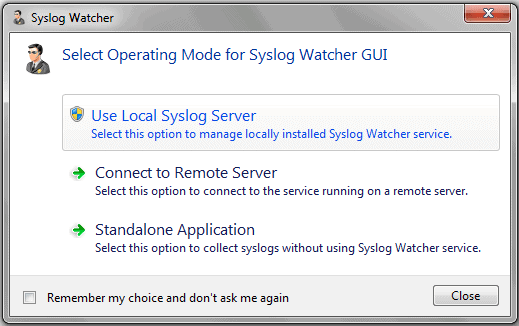
- Easy Integration: Once the syslog server is installed and live on the network, integration is as simple as installing the software on the desired syslog sources by selecting “Connect To Remote Server”, and entering the syslog server IP or hostname.
OS Compatibility
SnmpSoft Syslog Watcher can collect logs from Windows, Unix, Linux, and more. Any software that can send logs using the syslog protocol is supported as a syslog source.
The log collector is installed as a service, and the supported Operating Systems are Windows XP – Windows 10.
Screenshots


Download / Official Links
SnmpSoft Syslog Watcher can be downloaded from the following url:
https://dl.snmpsoft.com/sw/SyslogWatcherSetup-4.8.6-win32.msi
The main page is located at:
https://www.snmpsoft.com/syslog-watcher/
If you have any questions that are unanswered by their main page, or their support portal (https://support.snmpsoft.com/support/home), questions may be directed to support@snmpsoft.com and a support ticket will be opened for you.