
Remote System management has become important in today’s world of networks. With Remote Management, employees can access and manage their system from any remote location. Be it servers, endpoints, workstations, or activities on your system, by installing the remote software, organizations can manage and monitor everything from a remote location.
No doubt, users can solve most of the issues in person or on call, but there are certain issues that are complex and require experts to perform a set of actions or snippets of the script. Also, with remote software, you can pause your sessions and perform other tasks. But, without it, you might find it challenging to manage multiple sessions at once.
Also, with the help of remote support software, the technicians can track issues and resolve them remotely before any client notices them. Here, we have listed the two most prominent remote support software systems – Dameware Remote Everywhere and BeyondTrust.
We have also discussed their key features, benefits, and drawbacks in detail along with their pricing plan and use cases. Further, we have compared the two popular remote support software systems based on Documentation, Integration, Collaboration, and other factors.
Compare and conclude which remote support software solution works best for your organization and meets your budget and business requirement.
Dameware Remote Everywhere Product Highlights – FREE TRIAL
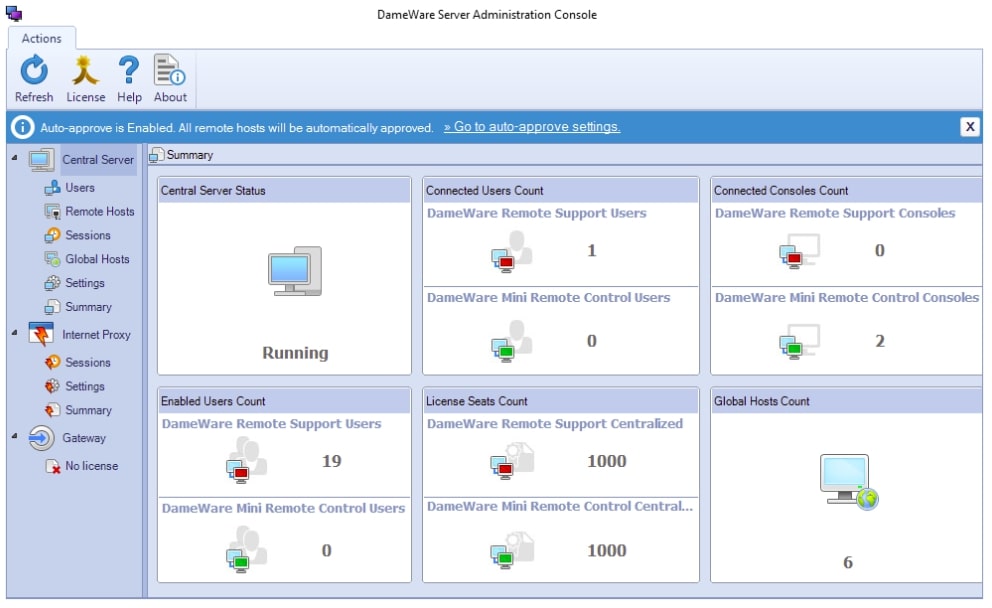
Dameware Remote Everywhere is a remote access software that allows a user to access and manage their remote machines. It can be used for accessing PCs, Macs, servers, and mobile devices.
Key Features
- Supports operating systems, including Windows, Mac OS X, or Linux
- Supports Android and iOS mobile devices
- Offers multi-monitor support
- Better visibility plus lightweight ticketing feature
- Live chats and video call options are available for interaction
- In-depth reporting and alert feature
- Access to save sessions and other details
- Supports Wake-on-LAN
- Supports multiple languages
- Provides thorough system information along with updates and Windows event logs
- Supports sleeping or powered-off systems
- Multi-factor authentication
- Advanced Encryption and Transport Layer Security 1.2 (TLS)
- Allows users to create quick active sessions
- License management
- Supports VNC Viewer and Intel AMT KVM
- Offers unattended support
- Supports USB forwarding
- Session recording is available
- IPv6 support
- The drag-and-drop feature is available
- Supports Active Directory integration
Unique feature
Dameware offers a lightweight ticketing feature and Wake-on-LAN support, allowing users to connect to unresponsive machines that are either sleeping or powered-off. These specific features are not available in BeyondTrust’s suite of services.
Why do we recommend it?
Dameware Remote Everywhere offers a robust set of features for remote access and support, including advanced security protocols and multi-factor authentication. Its flexibility in deployment options, either on-premise or SaaS, makes it a versatile choice for organizations of all sizes.
It has been designed to provide a single interface for managing all the remote machines from any location. The best part about Dameware Remote Everywhere is it provides the ability to transfer files and folders between computers easily. The software is compatible with Windows Vista, Windows 7, Windows 8, and Windows 10 and with some of the latest Mac operating systems including macOS Sierra and Sierra beta.
Dameware Remote Everywhere also supports remote connections through VPNs. Many organizations trust Dameware Remote Everywhere because it provides excellent remote control and support services. It is fast and secure software with advanced encryption and multi-factor authentication features. Just by installing a piece of client software, the host computer and remote users can easily communicate, investigate issues, and fix them on time.
The remote access software also supports Citrix terminal server environments such as XenApp, VDI, Microsoft Remote Desktop Services RDS, and Microsoft Virtual Desktop. Be it corporate systems, the general public, or system producers, each one of you can use Dameware Remote Everywhere for remote control and support services.
Who is it recommended for?
This tool is ideal for IT support teams and system administrators who require fast, secure, and scalable remote access solutions. It’s also well-suited for enterprises using a mix of operating systems and platforms, as it supports Windows, Mac, Linux, Android, and iOS.
Pros:
- Users can create MSI packages with specific settings and preferences
- You can connect the device via Wake-on-LAN support in case the machine is in an unresponsive state, i.e., sleeping or powered-off
- Fast, secure, and flexible remote support software
- The software is available as on-premise or as a subscription SaaS suitable for both the support team and end-users
- Using the remote support software, the employees can resolve issues faster and minimize software response time.
- Another advantage of Dameware Remote Everywhere is it resolves most of the issues from the backend without creating any impact on the performance and disturbing the end user.
- Dameware Remote Everywhere is highly secure and supports features like advanced encryption protocols, Transport Layer Security 1.2 (TLS), and multi-factor authentication.
- There is no limit to the number of devices, i.e., users can grant access to multiple devices using Dameware Remote Everywhere.
- Easily accessible via the browser
- Get better visibility into the screen of your remote device with the central remote control console supported by Dameware Remote Everywhere.
Cons:
- Short trial periods
- The cost per technician is a bit expensive
- Maintaining licensing is challenging
- DNS conflict may lead users to connect with the wrong PCs occasionally
Pricing
Dameware Mini Remote Control and Dameware Remote Support are the two packages supported by the Dameware system.
Dameware Mini Remote Control, the cheaper one, is used for help desk functions, troubleshooting, and problem resolution.
The Dameware Remote Support, the expensive one, includes all features of Dameware Mini Remote Control and license control.
Organizations that want to invest in Dameware Remote Support software must install a license for each device to use the application and access unlimited end users.
| Number of Technicians | Cost Per License |
|---|---|
| 1 | $370 |
| 2-3 | $365 |
| 4-5 | $355 |
| 6-9 | $345 |
| 10-14 | $330 |
| 15 or more | $295 |
Note: No matter which package you choose based on the number of technicians, the software provides access to unlimited end users.
You can access a 14-day free trial.
Use Cases
Many organizations use Dameware Remote Support for Remote Computer Management and Administration. The software has various advanced features that help administrators manage computers in a better way from remote locations without initiating any session. Also, it allows administrators to perform routine tasks fast. They also have access to export Active Directory objects and WMI from remote devices quickly and easily.
BeyondTrust Product Highlights
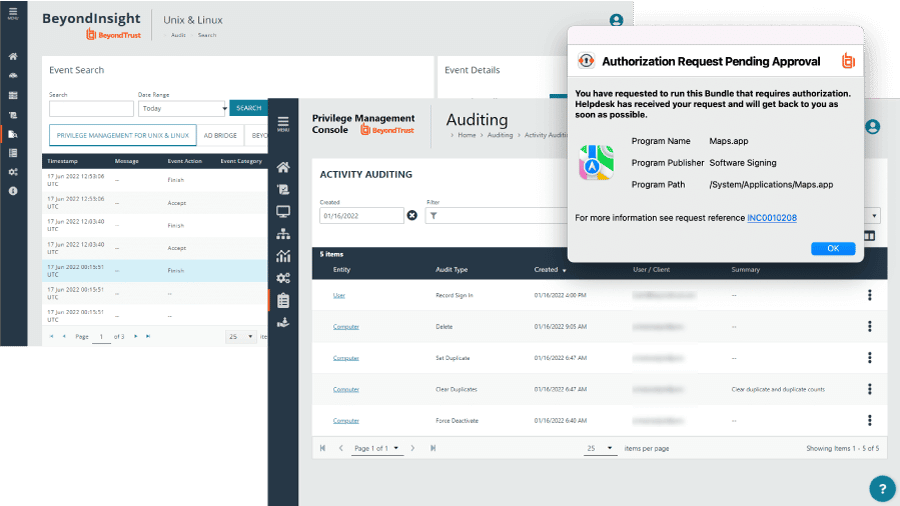
BeyondTrust also known as Bomgar is a leading company that provides remote access to computers and maintains the security of customer support service. It is a software company that has been around in the market for a long time and has been providing software solutions to the IT industry.
Key Features
- Session Recording
- Remote Printing
- Supports Windows, Mac, and Linux platforms
- Compatible with iOS or Android devices
- File and Session Transfer
- Audio Support
- Mobile Accessibility
- Live Video Streaming
- Collaboration Support
- Two-Factor Authentication
- Credentials Management
- Access Controls
- Endpoint Privilege Management
- Monitoring privileged accounts
- Password Management
- Audit Trail
- Monitor performance in real-time
- Chat and messaging option
- Customizable Branding
- Real-Time Notifications
- Detail Reporting
- Secure Data Storage
- Third-Party Integrations
- Screen Sharing
- Multi-Channel Communication
- Session Forensics
- Cloud Access Control
- Access Extender
Unique feature
BeyondTrust offers unique features like Endpoint Privilege Management and Session Forensics, which are not available in Dameware. BeyondTrust’s advanced Audit Trail capabilities provide an extra layer of security and accountability.
Why do we recommend it?
BeyondTrust excels in providing secure, multi-platform remote support with robust features like two-factor authentication, credentials management, and data encryption. Its centralized access control without the dependency on a VPN makes it stand out for business security.
It was founded in 2000 by David Liddle, who is the CEO of Bomgar. The company started as a business-to-business provider of remote support and remote access tools for IT professionals, but in recent years it has shifted its focus to business-to-consumer offerings, which include support for mobile devices, BYOD, and more.
The main aim of the company is now to provide controlled connections to any system regardless of its location. The software ensures that all your assets remain protected with its data encryption and security vault features.
Currently, known as BeyondTrust, it is one of the most secure remote support software and is used in around 80 countries. No matter where you reside, it includes features that aid your help desk teams to fix remote devices quickly. Be it mobile devices, computers, hardware, or peripherals, the software is compatible with all platforms and helps in achieving real results quickly.
eBay, CSC, CARBONITE, and RBC are a few popular companies that trust Bomgar.
Who is it recommended for?
This software is particularly beneficial for large enterprises and IT teams that prioritize security and require extensive control over remote access permissions. Its versatility also makes it suitable for businesses with a diverse set of devices, including mobile platforms and multiple operating systems.
Pros:
- Features like screen sharing and smart card authentication are restricted to specific applications.
- Bomgar offers excellent security features, thus ensuring your data remains safe at all times
- Supports multiple tools and embeddable chat functions
- Allows users to transfer files smoothly from one user to another
- The highly secure interface helps administrators in monitoring and controlling remote access to vital devices. This helps businesses in maintaining the system’s integrity.
- Supports vault and permission feature that ensures the passwords are secured and only authorized users can gain access to your data.
- Supports multiple systems, including iOS, Android, Windows, Linux, and Mac, operating systems.
- Centralized access and remote control over the device without depending on a VPN
- Offers reliable connectivity and enables employees to resolve issues faster.
Cons:
- Requires more automation and chat features
- Huge files take a lot of space
Pricing
Bomgar offers physical remote support and various pricing options along with maintenance for an annual fee. Organizations can choose from a cloud or on-premises model and compare their costs by reaching out to the support team for quotes.
No matter which model you choose for your organization, each of them offers the same level of features. Trusted by over 20,000 Companies, Bomgar is one of the leading and secure remote support software.
For comparing the models and their pricing plans, visit the official website and contact the support team.
You can access a 7-day free trial.
Use Cases
MANE is France’s leading flavor and fragrance group that reproduces scents and tastes. It has over 6,500 employees and is a well-established family firm with 50 R&D/Innovation centers across different countries. To preserve its business model for the long term and maintain secrecy, MANE depends on a secure solution. The main aim of the company is to increase the user experience, collaborate between subsidiaries, and ensure that trade secrets remain safe.
Thus, in order to improve the information system security and visibility over third-party suppliers and systems managers, MANE implemented the BeyondTrust Privileged Remote Access solution. By adopting this strategy, the firm not only improved its security posture but also simplified its administration.
It further helped the firm achieve automated workflows, positive financial impact, mitigation of cyber risks, and simplified administration.
Dameware Remote Everywhere vs BeyondTrust – Comparison Table
| Parameters | Dameware Remote Everywhere | BeyondTrust |
|---|---|---|
| Supported Operating Systems | Windows Server 2003, 2008, 2008R2, 2012R2, 2012 as well as Windows XP SP2 | Supports iPads, iPhones, Android, Windows, Mac, and Linux operating systems |
| Built-in encryption | Supports 3DES, and AES-256 encryption as well as smart card | Supports SSL and AES-256 encryption |
| Local file transfer | The Remote file transfer feature is available | The Local file transfer feature is available |
| Dual-monitor support | Supported by Dameware | Supported by Bomgar |
| Active Directory integration | Available | Available |
| Browser-based access | Supported via webapp | Not Supported |
| Export network service | Supported | Not Supported |
| Remote Printing | Available | This feature is not supported by Bomgar |
Dameware Remote Everywhere vs BeyondTrust – Key Differences
Dameware Remote Everywhere and BeyondTrust are the leading remote support solutions used by multiple companies around the world. Dameware Remote Everywhere is designed for quick implementation without any external dependencies. BeyondTrust, on the other hand, is designed for improving productivity and customer support security.
Both are similar yet differ in many ways. Let us compare the two high-level software solutions based on Documentation, Integration, Collaboration, and other factors.
Multiplatform Software
Dameware Remote Everywhere is compatible with most of the platforms, including Windows Server 2003, 2008, 2008R2, 2012R2, 2012 as well as Windows XP SP2, and allows smooth remote connections. The Bomgar, on the other hand, supports iPads, iPhones, Android, Windows, Mac, and Linux operating systems.
Collaboration
Collaboration is essential to deliver faster solutions to customers. It is an essential part that helps fix the problem by assigning tickets to authorized professionals in the organization.
Bomgar supports this function, and to speed up the First Call Resolution process, it allows users to request other support team members. It enables the help desk team to implement routing rules based on skills so that each end user reaches the right and most qualified representative for support in the organization, unlike Dameware.
Integrations
Bomgar supports integration with leading solutions, such as ITSM and CRM. However, Dameware supports limited integration, only with ITSM products supplied by the parent company – SolarWinds.
Documentation
The documentation supported by Dameware Remote Everywhere is a bit complex. Thus, making it difficult to understand by most users. However, the documentation supported by Bomgar is a bit easy to understand and informative. As a result, users find it much easier to work with Bomgar.
Protection of Information
No doubt, both software offers secure user connections. Each of the tools offers authentication and encryption features that ensure that the data is protected. For example, Bomgar offers various functions that protect its customer information, such as:
- Video recordings ensure that each member is following the correct procedure.
- Permissions are based on the level or equipment
- One-click login feature
Conclusion
Dameware Remote Everywhere and BeyondTrust are two of the most popular remote support software solutions available in the market. Managing issues over call can fix your problems, but to resolve complex issues, technicians need to look into the systems and fix them step by step. With remote software solutions, you can also pause your sessions and perform long downloads or other tasks.
Technicians can check what’s happening on their screens remotely and instantly resolve the issue with tools like Dameware Remote Everywhere and BeyondTrust.
Dameware Remote Everywhere provides a single interface to transfer files and access PCs, Macs, servers, and mobile devices. It also supports remote connections through VPNs and features like advanced encryption and multi-factor authentication. Apart from updates and Windows event logs, Dameware also provides thorough system information. We have listed some of its pros and cons in the above section that will help you determine whether the software meets your business requirement or not.
BeyondTrust (Bomgar), on the other hand, is designed to provide remote access to computers and maintain the security of customer support service. It ensures that all your assets remain protected and safe at all times. We have also listed the pros and cons of Bomgar in the above section which will help determine if the software fills in your needs.
We have further compared the two based on various factors, including Documentation, Integration, Collaboration, platform support, etc., and listed the pricing plan for each software that will make it easier for you to decide which software lies within your budget and is best for your organization.
