

Cloud computing has been a game-changer for many companies as it provides the much-needed flexibility and scalability to leverage new opportunities as they appear.
Cloud computing can be divided into three broad categories:
- Software as a Service (SaaS) – These applications are delivered over the Internet and you can start using them right away.
- Platform as a Service (PaaS) – This service provides the platform needed to build your custom app and deploy them in your infrastructure.
- Infrastructure as a Service (IaaS) – In this service, you rent all the infrastructure required by your organization such as virtual servers, storage, operating systems, and more.
A good analogy to understand these services is your dinner. When you have all the raw ingredients and have to make pizza right from the dough, it is IaaS. On the other hand, a frozen pizza that is cooked in an oven and topped with extra cheese is your PaaS while a pizza takeout is your SaaS.
Prominent vendors like Amazon and Microsoft offer all these three services, so all that you have to do is decide what your organization needs and rent/subscribe accordingly. In this article, we will focus on the IaaS and PaaS offerings of Microsoft Azure as these two are highly popular.
What is Azure IaaS?
Azure offers a wide range of infrastructure to meet all your organization’s networking and computing needs. You can choose from container services, virtual servers, operating systems, storage devices, hardware components, and more.
Besides the flexibility to choose the infrastructure you want, you can also scale it up or down within minutes, without worrying about investing in new equipment, installation, etc. Needless to say, it is a cost-effective option that doesn’t compromise on flexibility in any way.
The other advantage of Azure IaaS is that it is managed on your behalf, so you don’t have to worry about compatibility issues or fixing downtimes. In all, it is a hands-free approach where you simply rent the infrastructure you need to run your business.
What is Azure PaaS?
As mentioned earlier, PaaS is your middle layer that offers the platform support required to build and deploy your applications.
Azure offers many PaaS services such as Azure App Services, CDN, Azure Search, and more, to deploy a cloud application quickly. Many aspects of deployment such as load balancing, security, business intelligence, and patch management are automatically handled by the system, so you can focus on building the application.
The platform also scales well to meet your growing business needs and doesn’t require additional configurations or effort from your end. Also, it is cost-effective as you don’t have to buy separate licenses.
Now that you have an idea of what IaaS and PaaS offer, let’s compare them to help you decide what your organization needs.
IaaS vs PaaS
Here is a table that summarizes the differences between IaaS and PaaS.
| IaaS | PaaS |
| Ideal for setting up the runtime and database for your organization. | Works well for setting up the production and testing environments for deployments. |
| One of the biggest reasons is cost-saving, as you don't have to invest and maintain new equipment. | Helps to leverage built-in services such as directory services, security, runtime environments, and more. |
| Supports real-time usage of vast amounts of data. | Supports the usage of supercomputers and other resource-intensive applications. |
In all, use PaaS when you want to focus on application development and deployment while IaaS is a good option to set up the complete environment needed for your IT operations.
Managing IaaS and PaaS
Regardless of whether you choose IaaS or PaaS, you have to track the usage, as the cost depends on what you use. Typically, organizations have many departments and teams, and each may use a different IaaS or PaaS service. As a result, costs can quickly add up within your organization and you may not have the visibility and a 360-degree view of cloud services.
Since these services are run by third-party vendors, you may also want to ensure that they are available and performing at the agreed service levels to ensure that the performance of your applications is not impacted.
To get all this information and to stay on top of the performance and availability of Azure IaaS and PaaS, use third-party tools like the SolarWinds Server and Application Monitor (SAM). But what is SolarWinds SAM?
SolarWinds Server and Application Monitor (SAM) – FREE TRIAL
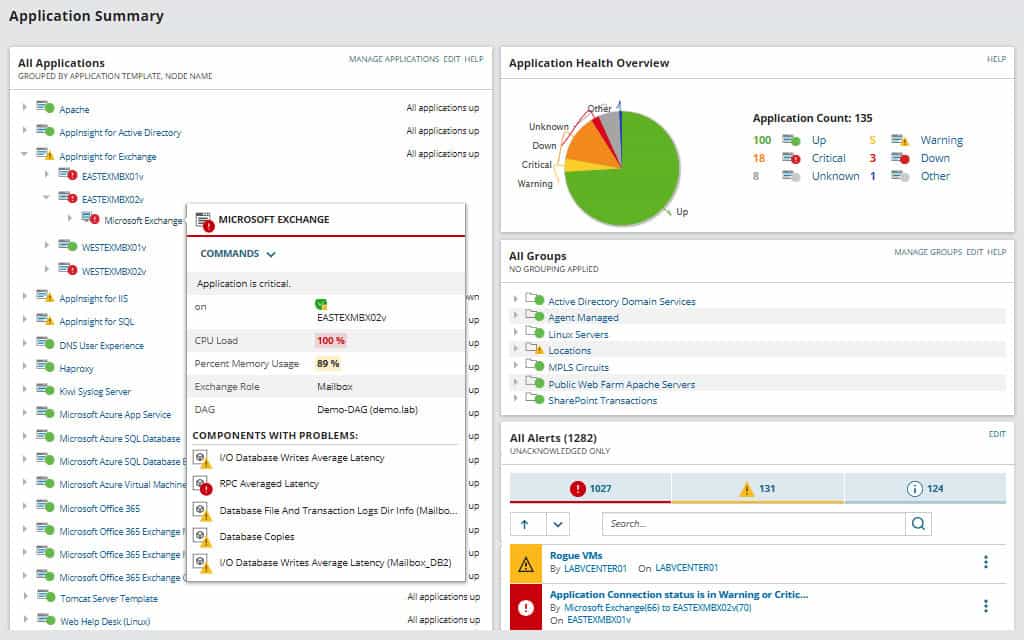
SolarWinds SAM is a comprehensive server and application monitoring tool that can monitor your Azure and AWS IaaS, SaaS, and PaaS.
Here’s a look at some of its salient features:
- Monitoring Templates It comes with more than 1,200 monitoring templates that work well across cloud, on-premises, and hybrid environments. These templates map out application dependencies, monitor applications and their performance, plan resources capacity, track usage, and costs, and more. Further, it also monitors your complex Azure to provide contextual insights that you can leverage to make the most of your investment. These insights also help with dynamic baselining, so alerts can be configured accordingly. Its auto-discovery feature also ensures that you’re on top of all the devices and containers that use Azure services.
- Performance Details SAM offers insights into the performance of Azure IaaS and PaaS services in a single pane to help you take the required measures for improved optimization. It can also stay on top of the performance of critical components such as CPU, memory, response time, and more for dynamic Azure workloads. It even comes with a custom API for building metrics that are not already available in Azure.
- Comprehensive SAM extends beyond just IaaS and PaaS and monitors your entire Microsoft ecosystem to give a comprehensive and centralized view of all products and services. It helps to optimize the performance of services such as Active Directory, Exchange, IIS Server, .NET applications, SharePoint, Windows Server, Office 365, SQL Server, and more.
In all, SAM is an advanced tool that can monitor the performance and usage of your Azure IaaS and PaaS services.
Click here for the SolarWinds SAM fully functional 30-day free trial.
Site24x7 Azure Monitoring Tool – FREE TRIAL
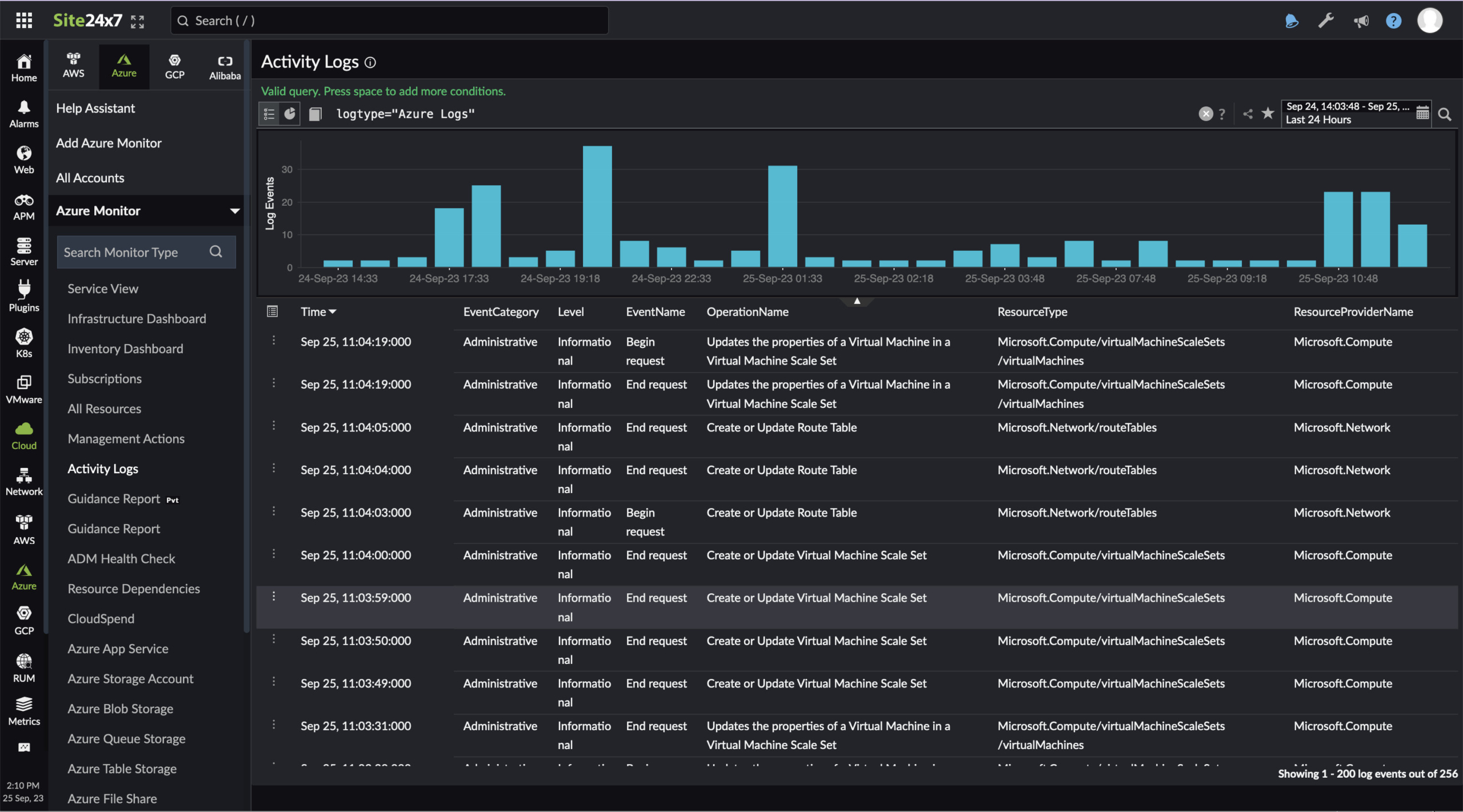
With Site24x7 Azure Monitoring Tool, organizations can keep track of all virtual systems, cloud-based as well as on-premises resources. Also, the tool does not limit you to a single Azure integration but provides a complete list of specialized module monitors for each Azure service.
Key Features
- Azure service and application monitoring
- AI-powered monitoring and performance alerts
- Auto-discover Azure resources
- Automate incident remediation
- Out-of-the-box reporting
- Supports integration with ITSM
It even comes with an IT automation feature that helps automatically remediate all your incidents and improve IT operational efficiency. As a result, businesses can prevent possible problems by being proactive and taking action without the need for manual assistance. Users can even access best practice recommendations that will eventually help reduce resolution time and enhance end-user satisfaction.
Another benefit of choosing Site24x7 is it helps map dependencies between server resources and applications, regardless of your location or resource availability. It makes it easier to track how each resource on different platforms and Azure services communicates with one another.
Why do we recommend it?
Site24x7 Azure Monitoring Tool offers clear visibility into the performance and availability of more than 100 Azure services. Users can even access pre-built reports, auto-discover Azure resources, and status update alerts in real-time.
Who is it recommended for?
The tool was designed keeping small businesses in mind. However, MSPs and large businesses can also use the tool and pay an additional fee for more capacity.
Pros:
- Monitor 100+ azure services from a single console
- Network map creation and inventory reporting using real-time data
- Site24x7 Azure Monitoring Tool supports product-specific integrations
- Users can access the cloud-based system dashboard from any location
Cons:
- Understanding all the features and functionalities might take some time as it is a comprehensive monitoring tool.
Conclusion
Cloud computing is implemented as SaaS, PaaS, or IaaS, with each category offering a distinct set of services. Vendors like Microsoft Azure and Amazon AWS offer services across all three categories. Out of these, there are confusions in understanding IaaS and Paas.
We hope this article gives you a clear understanding of these two categories, and how you can manage them using third-party tools like the SolarWinds Server and Application Monitor (SAM) or the Site24x7 Azure Monitoring Tool.
