
NetAdminTools.com
 
SignalQ Sites:
NetAdminTools - Coprolite - SpotBridge - NAW
RoboCoop - AreWeDown - SolarPower - SysAdminTools
Xfig - Gold Loaf - GeekPapa - FixGMC - FixRambler
Categories:
GNU/Linux | Homebrew designs | Perl | Ruby | Administration | Backup/Recovery | Bugs/Fixes | Certification | Database | Email | File/Print | Hardware | Information Grab Bag | Interoperability | GNU/Linux ABCs | Monitoring | Name Resolution | Network Services | Networking | Remote Control | Security | Desktop | Web | BSD | Solaris | GIAGD | ERP | REALbasic

Last 30 Days | Last 60 Days | Last 90 Days | All Articles | GNU/Linux Reference OS Build | MCJ How-to | MCJ Presentation Config | Keywords | RSS


Categories:
·GNU/Linux
·Homebrew designs
·Perl
·Ruby
·Administration
·Backup/Recovery
·Bugs/Fixes
·Certification
·Database
·Email
·File/Print
·Hardware
·Information Grab Bag
·Interoperability
·GNU/Linux ABCs
·Monitoring
·Name Resolution
·Network Services
·Networking
·Remote Control
·Security
·Desktop
·Web
·BSD
·Solaris
·GIAGD
·ERP
·REALbasic
·All Categories


Software RAID on Windows 2003 - Part1
Topic:Backup/Recovery   Date: 2005-08-25
Printer Friendly: Print

spacerspacer
<<  <   >  >>

Subject

There are 5 parts to this article:
Part1 - Part2 - Part3 - Part4 - Part5

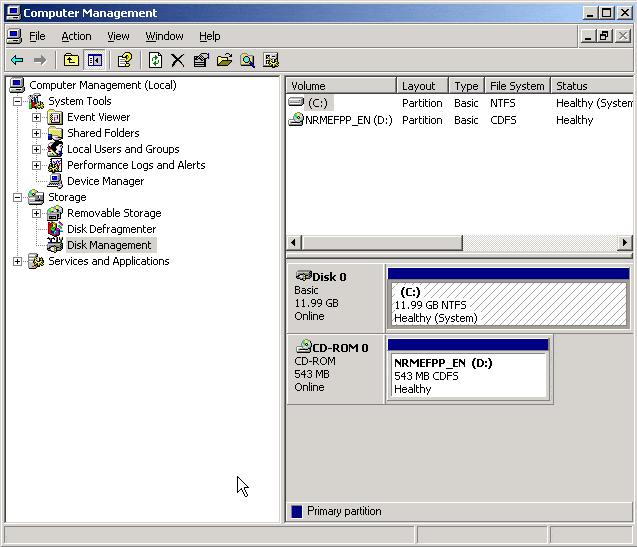
This series of articles will show how to set up software RAID on a Windows Server 2003 system. Before you do anything with your disks, make sure you have a good backup. Please read our terms of use. We will start with one Basic drive, create a RAID1 set on a new drive we install, remove the first drive, and recover from the second. We wrote up an article over seven years ago here about Windows Server software RAID, and it is definately time to provide an update. First off, we have a single 12 gig drive running in Basic mode:


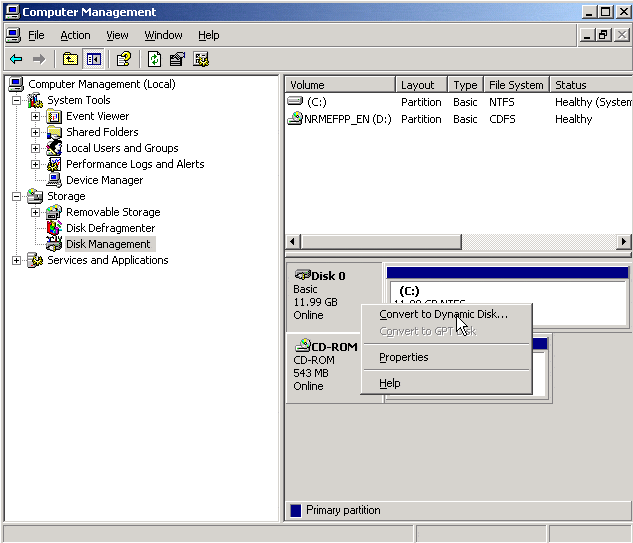
To run Software RAID, you need to convert this drive to a Dynamic Disk. Note that on Windows Server 2003 this is possible after installing the disk as Basic. To convert to a Dynamic Disk, simply right-click on the drive and select Convert to Dynamic Disk:


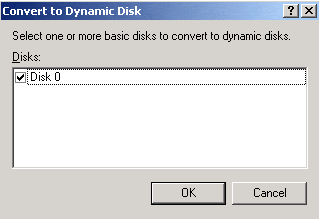
Check the disk you wish to convert:


Confirm which disks you want to convert to Dynamic:
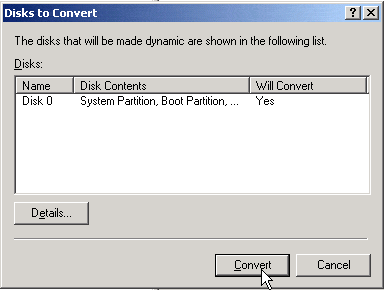


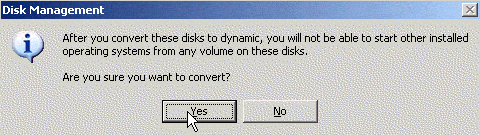
You will be warned that converting this disk drive will limit the ability of other operating systmes to start for any volumes on the disk.


Next

There are 5 parts to this article:
Part1 - Part2 - Part3 - Part4 - Part5


People:
Places:
Things:
Times:


Please read our Terms of Use and our Privacy Policy
Microsoft, Windows, Windows XP, Windows 2003, Windows 2000, and NT are either trademarks or registered trademarks of Microsoft Corporation. NetAdminTools.com is not affiliated with Microsoft Corporation. Linux is a registered trademark of Linus Torvalds, and refers to the Linux kernel. The operating system of most distributions that contain the Linux kernel is GNU/Linux. All logos and trademarks in this site are property of their respective owner. Copyright 1997-2010 NetAdminTools.com