
In this article we added a record to our systems database. We made a mistake, though, and would like to update the record so that the date is correct. Here is the current date:
mysql> select manu, model, deploy_date, sernum, sysversion from systemsdoc -> where UID=8; +-----------------+---------+-------------+--------+--------------+ | manu | model | deploy_date | sernum | sysversion | +-----------------+---------+-------------+--------+--------------+ | Sam's Computers | GX 1000 | 08/58/2002 | 230948 | Windows 2003 | +-----------------+---------+-------------+--------+--------------+ 1 row in set (0.00 sec) |
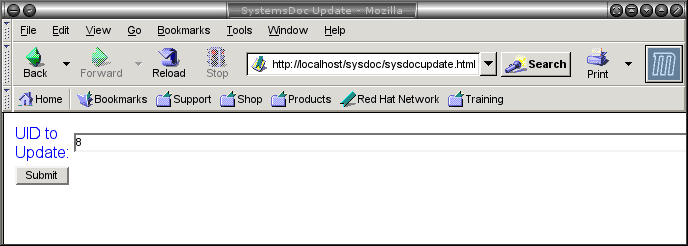
What we want is 08/08/2003 as the deploy_date. We can do this with three files. We need an HTML file to select the UID to update, a PHP file to display the current record and provide fields to update, and another PHP file to confirm the update and apply it to the database. We plan to use UID to link to more details about the associated user for this record in future articles. For now, this is the unique field we use to look up records. Here is the HTML file sysdocupdate.html:
<html> <head> <title>SystemsDoc Update</title> </head> <body bgcolor="white"> <form method="POST" action="sysdocupdate.php"> <table> <col span="1" align="right"> <tr> <td><font color="blue">UID to Update:</font></td> <td><input type="text" name="UID" size=100></td> </tr> <tr> <td><input type="submit" value="Submit"></td> </tr> </table> </form> </body> </html> |
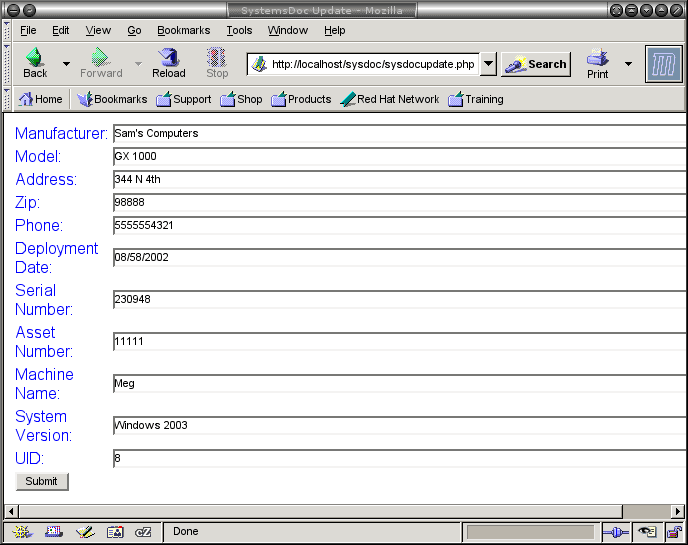
Here is the PHP file sysdocupdate.php that populates the fields for updating:
<?php
foreach($HTTP_POST_VARS as $varname => $value)
$formVars[$varname]=$value;
require_once("config.php");
$db1=mysql_connect($dbhost, $dbuname, $dbpass);
mysql_select_db("sysops");
$query="SELECT * FROM systemsdoc WHERE UID = \"".$formVars["UID"]."\"";
$result=mysql_query($query);
$row=mysql_fetch_array($result);
$formVars = array();
$formVars["manu"]=$row["manu"];
$formVars["model"]=$row["model"];
$formVars["addr"]=$row["addr"];
$formVars["zip"]=$row["zip"];
$formVars["phone"]=$row["phone"];
$formVars["deploy_date"]=$row["deploy_date"];
$formVars["sernum"]=$row["sernum"];
$formVars["assetnum"]=$row["assetnum"];
$formVars["machname"]=$row["machname"];
$formVars["sysversion"]=$row["sysversion"];
$formVars["UID"]=$row["UID"];
mysql_close($db1);
?>
<html>
<head>
<title>SystemsDoc Update</title>
</head>
<body bgcolor="white">
<form method="post" action="postupdate.php">
<table>
<col span="1" align="right">
<tr>
<td><font color="blue">Manufacturer:</font></td>
<td><input type="text" name="manu"
value="<? echo $formVars["manu"]; ?>" size=100></td>
</tr>
<tr>
<td><font color="blue">Model:</font></td>
<td><input type="text" name="model"
value="<? echo $formVars["model"]; ?>" size=100></td>
</tr>
<tr>
<td><font color="blue">Address:</font></td>
<td><input type="text" name="addr"
value="<? echo $formVars["addr"]; ?>" size=100></td>
</tr>
<tr>
<td><font color="blue">Zip:</font></td>
<td><input type="text" name="zip"
value="<? echo $formVars["zip"]; ?>" size=100></td>
</tr>
<tr>
<td><font color="blue">Phone:</font></td>
<td><input type="text" name="phone"
value="<? echo $formVars["phone"]; ?>" size=100></td>
</tr>
<tr>
<td><font color="blue">Deployment Date:</font></td>
<td><input type="text" name="deploy_date"
value="<? echo $formVars["deploy_date"]; ?>" size=100></td>
</tr>
<tr>
<td><font color="blue">Serial Number:</font></td>
<td><input type="text" name="sernum"
value="<? echo $formVars["sernum"]; ?>" size=100></td>
</tr>
<tr>
<td><font color="blue">Asset Number:</font></td>
<td><input type="text" name="assetnum"
value="<? echo $formVars["assetnum"]; ?>" size=100></td>
</tr>
<tr>
<td><font color="blue">Machine Name:</font></td>
<td><input type="text" name="machname"
value="<? echo $formVars["machname"]; ?>" size=100></td>
</tr>
<tr>
<td><font color="blue">System Version:</font></td>
<td><input type="text" name="sysversion"
value="<? echo $formVars["sysversion"]; ?>" size=100></td>
</tr>
<tr>
<td><font color="blue">UID:</font></td>
<td><input type="text" name="UID"
value="<? echo $formVars["UID"]; ?>" size=100></td>
</tr>
<tr>
<td><input type="submit" value="Submit"></td>
</tr>
</body>
</html>
|
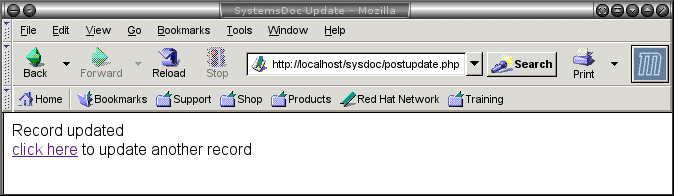
Here is the php file postupdate.php that does the update:
<html>
<head>
<title>SystemsDoc Update</title>
</head>
<body bgcolor="white">
<?php
foreach($HTTP_POST_VARS as $varname => $value)
$formVars[$varname]=$value;
require_once("config.php");
$db1=mysql_connect($dbhost, $dbuname, $dbpass);
mysql_select_db("sysops");
echo "Record updated<br><a href=\"sysdocupdate.html\">click here</a> to update another record<br>";
$query="UPDATE systemsdoc set ".
"manu= \"".$formVars["manu"]."\",".
"model= \"".$formVars["model"]."\",".
"addr= \"".$formVars["addr"]."\",".
"zip= \"".$formVars["zip"]."\",".
"phone= \"".$formVars["phone"]."\",".
"deploy_date= \"".$formVars["deploy_date"]."\",".
"sernum= \"".$formVars["sernum"]."\",".
"assetnum= \"".$formVars["assetnum"]."\",".
"machname= \"".$formVars["machname"]."\",".
"sysversion= \"".$formVars["sysversion"].
"\" WHERE UID = \"".$formVars["UID"]."\"";
mysql_query($query);
mysql_close($db1);
?>
</body>
</html>
|
Here is how this looks:
Let’s verify that the update took:
mysql> select manu, model, deploy_date, sernum, sysversion from systemsdoc -> where UID=8; +-----------------+---------+-------------+--------+--------------+ | manu | model | deploy_date | sernum | sysversion | +-----------------+---------+-------------+--------+--------------+ | Sam's Computers | GX 1000 | 08/08/2003 | 230948 | Windows 2003 | +-----------------+---------+-------------+--------+--------------+ 1 row in set (0.00 sec) mysql> |
Nice!!!


