
In this article we showed how to set up the Network Load Balancing service on Windows 2000 Advanced Server. In this article, we will show how to set up Terminal Services to use Network Load Balancing.
One big limitation with running Terminal Services with network load balacing on Windows 2000 Advanced Server is that the sessions are not tracked. This means that if a user disconnects, the next time the user connects to the cluster, the user may or may not be connected to the server that has the disconnected session.
There are some options to connect users with the same IP address to the same server, but PAT/NAT, and proxy servers can muck this up. (We discuss this in further detail in this article). This is resolved in Windows Server 2003, Enterprise Edition and Windows Server 2003, Datacenter Edition, via the Session Directory. This article, though, assumes you are using Windows 2000 Advanced Server out of the box.
We are starting with the same configuration we used in this article. First, we need to modify our configuration by changing the port rules:
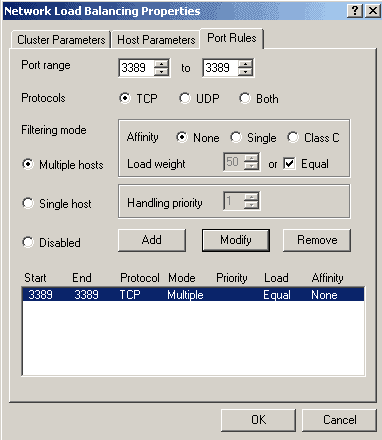
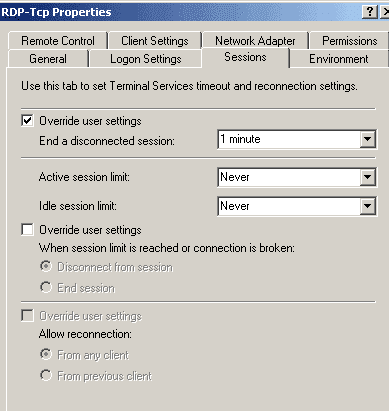
If you are load balancing between for clients that appear to have the same IP address, then you will need to set affinity to none if you want to have load balancing. To avoid problems with disconnected sessions, set your RDP-TCP Properties Sessions tab in Terminal Services Configuration:
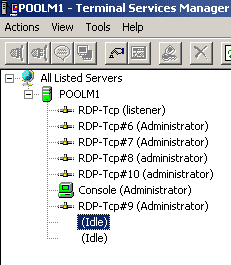
We opened five sessions with rdesktop on our main GNU/Linux workstation, and five sessions from our XP box. Here is what Terminal Services looks like on the .46 server:
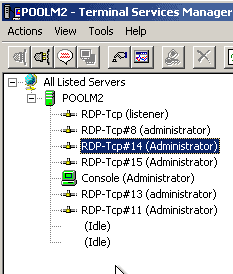
On the .47 server:
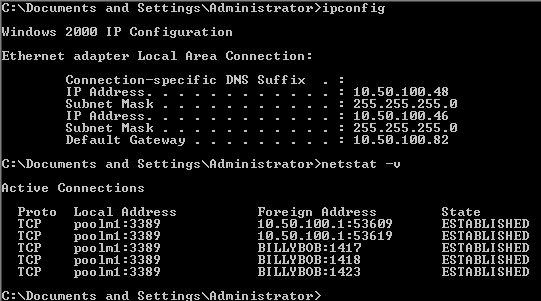
Here is netstat -v output on the .46 server:
On the .47 server:
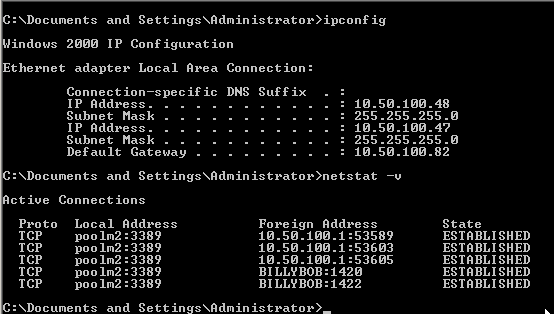
Notice that even though clients came from the same IP address, they distributed between the two servers in our cluster. This is what we wanted. If your clients will always have different IP addresses, then you could set affinity in Network Load Balancing to Single. You could then allow users to disconnect. As long as they reconnected from the same IP address, then they could reconnect to their session.
For more info on using Network Load Balancing with Terminal Services, check out this article.


