
GKrellM is a GPL’d multi-platform monitoring program. For a Windows port, see Bill’s Software. In this article we will get GKrellM running on 5 different systems and use client/server mode to connect via SSH, and monitor the systems from a centralized console. We are quite excited about this project because it is client/server (now), has plugins, multiple platform support, and is licensed under the GPL. Big Brother is much more mature, and has many more features, but the licensing is not GPL. Here is a basic display:
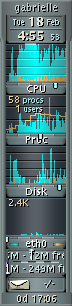
First, we want to compile this on our gentoo/sparc64 box. Now, there are quite a few dependencies required. It turns out that the Gentoo Portage stuff is so far behind that an emerge gkrellm failed; however, it did get all the dependencies, and then:
srv-44 src # tar -xjf gkrellm-2.1.7a.tar.bz2 srv-44 src # ls gkrellm-2.1.7a gkrellm-2.1.7a.tar.bz2 srv-44 src # cd gkrell* srv-44 gkrellm-2.1.7a # make (cd po && make all) make[1]: Entering directory `/usr/local/src/gkrellm-2.1.7a/po' . . . config --libs glib-2.0 gthread-2.0` -Wl,-E make[1]: Leaving directory `/usr/local/src/gkrellm-2.1.7a/server' srv-44 gkrellm-2.1.7a # srv-44 gkrellm-2.1.7a # make install (cd po && make install) make[1]: Entering directory `/usr/local/src/gkrellm-2.1.7a/po' make all . . . install -c -m 644 ../gkrellmd.1 /usr/local/share/man/man1/gkrellmd.1 make[1]: Leaving directory `/usr/local/src/gkrellm-2.1.7a/server' |
We don’t have a graphics display hooked up to any of these servers. For grins, let’s export the display:
root@srv-1 u-1 # /usr/X11R6/bin/xhost +10.50.100.50 10.50.100.50 being added to access control list srv-44 bin # export DISPLAY=srv-1:0 srv-44 bin # ./gkrellm |
On srv-1 we see this pop up. The configuration options look like this This is kind of a heavy way to do this. A better way is to use client/server mode. Beware, though, the client/server mode is brand spanking new for GKrellM. Keep a close eye on this. Security holes, lockups, CPU usage problems, and memory leaks are common with a new app like this. It looks good in our labs, though. The gkrelld command is the server piece that runs on the machine being monitored. We’ll use the -d option to detach the process:
srv-44 bin # gkrellmd -d u-1@srv-1 u-1 $ gkrellm2 -s 10.50.100.50 |
That’s cool. Let’s force the port, though:
srv-44 linux-2.4.20 # gkrellmd -d -P 3000 u-1@srv-1 u-1 $ gkrellm2 -s 10.50.100.50 -P 3000 srv-44 linux-2.4.20 # netstat -v Active Internet connections (w/o servers) Proto Recv-Q Send-Q Local Add Foreign Add State tcp 0 0 srv-44:3000 srv-1:44388 ESTABLISHED tcp 0 160 srv-44:ssh srv-1:43631 ESTABLISHED srv-44 linux-2.4.20 # |
Now, we don’t want anybody to be able to connect to this daemon. There are some security options where you can limit connections by hostname, but a better way is to tunnel via SSH. We can do this:
root@srv-1 u-1 # ssh -L 3000:srv-44:3000 srv-44 u-1@srv-1 u-1 $ gkrellm2 -s localhost -P 3000 srv-44 sshd # netstat -v Active Internet connections (w/o servers) Proto Recv-Q Send-Q Local Address Foreign Address State tcp 0 0 srv-44:3000 srv-44:32809 ESTABLISHED tcp 0 0 srv-44:32809 srv-44:3000 ESTABLISHED tcp 0 160 srv-44:ssh srv-1:44411 ESTABLISHED u-1@srv-1 u-1 $ netstat -v Active Internet connections (w/o servers) Proto Recv-Q Send-Q Local Address Foreign Address State tcp 0 0 localhost:44425 localhost:3000 ESTABLISHED tcp 0 0 localhost:3000 localhost:44425 ESTABLISHED tcp 0 0 srv-1:44411 srv-44:ssh ESTABLISHED Active UNIX domain sockets (w/o servers) |
Cool. The only connections between the client and server are via ssh. Let’s set this up for the rest of the cast:
u-1@srv-1 u-1 $ ssh -L 3000:srv-3:3000 root@srv-3 [root@srv-3 root]# gkrellmd -d -P 3000 u-1@srv-1 u-1 $ gkrellm2 -s localhost -P 3000 & [1] 32154 u-1@srv-1 u-1 $ ssh -L 3001:srv-33:3000 root@srv-33 [root@srv-33 root]# gkrellmd -d -P 3000 u-1@srv-1 u-1 $ gkrellm2 -s localhost -P 3001 & [2] 32155 u-1@srv-1 u-1 $ ssh -L 3002:srv-44:3000 root@srv-44 srv-44 root # gkrellmd -d -P 3000 u-1@srv-1 u-1 $ gkrellm2 -s localhost -P 3002 & [3] 32280 u-1@srv-1 u-1 $ ssh -L 3003:srv-34:3000 root@srv-34 [root@srv-34 /]# gkrellmd -d -P 3000 u-1@srv-1 u-1 $ gkrellm2 -s localhost -P 3003 & [5] 32323 u-1@srv-1 u-1 $ ssh -L 3005:ares:3000 root@ares [root@ares /]# gkrellmd -d -P 3000 u-1@srv-1 u-1 $ gkrellm2 -s localhost -P 3005 & [1] 32531 |
Here is a screenshot of our monitoring system with rolled-up xterm sessions over ssh on the right.


