


Advanced port scanner is a small and robust tool useful for scanning ports.
This free network scanner scans network devices and makes it easy to find open ports quickly.
It even retrieve versions of programs running on these identified ports.
Features
Advanced Port Scanner comes with the following features.
- It is powered by Multi-Threaded scan technology, which means, it can scan hundreds of ports in just a few seconds.
- It is a small program that only requires little space on your computer.
- It can scan pre-defined port ranges as well.
- Provides information about ports and network devices.
- Gives easy access to resources found such as HTTP, HTTPS, FTP and shared folders.
- Fully configurable port scan
- You can choose to give names to the list of ports you’re entering for scan
- Runs commands on a remote computer with ping, tracert, telnet and SSH.
- Gives remote access to computers using RDP and Radmin
- Provides the flexibility of Wake on LAN and remote PC shutdown
- Results of scanning can be exported to .xml, .html and .csv formats.
- No manual installation is required as you can launch it directly from the installer.
- You can create a favorite list of computers you use regularly.
- Simplifies search of local networks
- Comes with a user-friendly and intuitive interface.
- Ideal for everyone, regardless of technical knowledge or background
System Requirements
Advanced Port Scanner works well in the following systems.
- Windows 7, 98, ME, NT, XP, 95, 2003 and Vista
- A separate tool exists for Mac OS
How to use it?
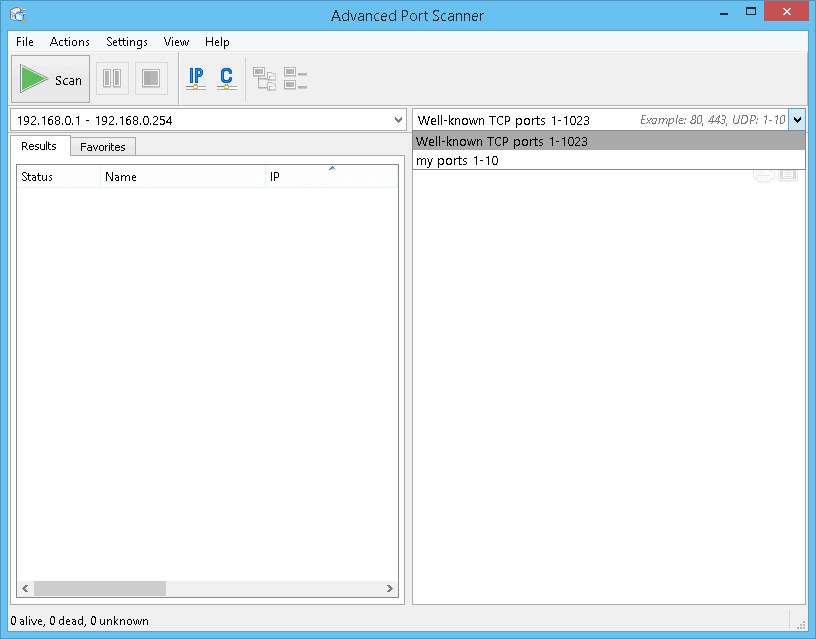
One of the highlights of Advanced Port Scanner is its intuitive user-interface.
As soon as you open the program, the main window prompts you to input the scan target.
This can be a single IP address or a whole range.
The same applies to ports as well, but in addition to scanning, this tool also comes with a default port list that includes many common ports used by Windows.
Once you input the scan target, Advanced Port Scanner will scan them.
Each scanned machine is displayed on the right side of the main window in a dedicated panel.
The information displayed will include the number of scanned, opened and closed ports.
Besides the main window, Advanced Port Scanner also comes with a configuration screen that has some advanced options.
In this screen, you can set the maximum number of threads, threads priority, port scan timeout and even the option to ping computers before scanning them.
Price
Advanced Port Scanner is 100% FREE.
Screenshots


Download
Official Site:
https://www.advanced-port-scanner.com/
Download Advanced Port Scanner:
https://www.advanced-port-scanner.com/
Click the DOWNLOAD BUTTON on the Homepage