
Monit is a small, easy to configure monitoring system for *nix systems that will attempt to restart services that have failed. Grab the tarball, extract, configure, make, and make install:
[usr-1@srv-1 ~]$ tar -xzf mon*4.7*.gz [usr-1@srv-1 ~]$ cd mon*7 [usr-1@srv-1 monit-4.7]$ ./configure checking for gcc... gcc checking for C compiler default output file name... a.out checking whether the C compiler works... yes . . . monit has been configured with the following options: Architecture: LINUX SSL support: enabled SSL include directory: /usr/include SSL library directory: /usr/lib resource monitoring: enabled resource code: sysdep_LINUX.c Compiler flags: -g -O2 -Wall -D _REENTRANT -I/usr/include Linker flags: -lpthread -lcrypt -lresolv -lnsl -L/usr/lib -lssl -lcrypto pid file location: /var/run [usr-1@srv-1 monit-4.7]$ [usr-1@srv-1 monit-4.7]$ make bison -y -dt p.y /bin/mv -f y.tab.h tokens.h flex -i l.l gcc -c -DLINUX -I. -I./device -I./http -I./process -I./protocols . . . protocols/rdate.o protocols/rsync.o protocols/smtp.o protocols/ssh.o protocols/tns.o device/sysdep_LINUX.o process/sysdep_LINUX.o y.tab.o lex.yy.o -lfl -lpthread -lcrypt -lresolv -lnsl -L/usr/lib -lssl -lcrypto -o monit [usr-1@srv-1 monit-4.7]$ [usr-1@srv-1 monit-4.7]$ su Password: [root@srv-1 monit-4.7]# make install /usr/bin/install -c -m 755 -d /usr/local/bin || exit 1 /usr/bin/install -c -m 755 -d /usr/local/man/man1 || exit 1 /usr/bin/install -c -m 555 -s monit /usr/local/bin || exit 1 /usr/bin/install -c -m 444 monit.1 /usr/local/man/man1/monit.1 || exit 1 [root@srv-1 monit-4.7]# |
The configuration file is stored in /etc/monitrc. The top part of the configuration file sets the polling intervals, logging options, and web interface options. After that, just add on sections for the services to check and recover. Here is a sample config file that checks sshd:
[root@srv-1 usr-1]# cat /etc/monitrc set daemon 120 # Poll at 2-minute intervals set logfile syslog facility log_daemon set alert root@localhost set httpd port 2812 and use address localhost allow localhost # Allow localhost to connect allow admin:monit # Allow Basic Auth check process sshd with pidfile /var/run/sshd.pid start program "/etc/init.d/sshd start" stop program "/etc/init.d/sshd stop" if failed port 22 protocol ssh then restart if 5 restarts within 5 cycles then timeout [root@srv-1 usr-1]# |
Let’s start the monit daemon:
[root@srv-1 usr-1]# monit Starting monit daemon with http interface at [localhost:2812] [root@srv-1 usr-1]# [root@srv-1 usr-1]# tail /var/log/messages Apr 27 08:36:20 srv-1 monit[3258]: Starting monit daemon with http interface at [localhost:2812] Apr 27 08:36:20 srv-1 monit[3260]: Starting monit HTTP server at [localhost:2812] Apr 27 08:36:20 srv-1 monit[3260]: monit HTTP server started Apr 27 08:36:20 srv-1 monit[3260]: Monit started |
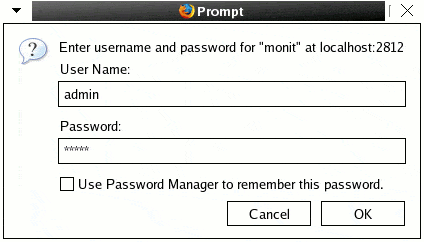
The logon, as we set in the monitrc, is admin with a password of monit:
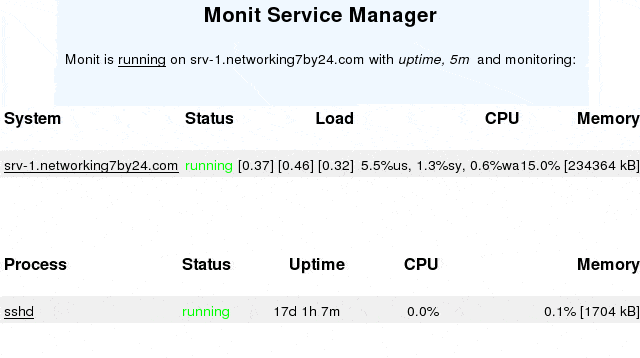
Here is what the administration web console looks like:
For a test, let’s stop sshd and try and connect from another host:
[root@srv-1 usr-1]# /etc/init.d/sshd stop Stopping sshd: [ OK ] [root@srv-1 usr-1]# srv-5:~ usr4$ ssh usr-1@10.50.100.1 ssh: connect to host 10.50.100.1 port 22: Connection refused |
Just wait a bit and try and reconnect:
srv-5:~ usr4$ ssh usr-1@10.50.100.1 Last login: Thu Apr 27 08:37:52 2006 from 10.50.100.200 [usr-1@srv-1 ~]$ |
We are back in! The logs show that monit did what it was supposed to do:
Apr 27 08:52:25 srv-1 monit[3260]: 'sshd' process is not running Apr 27 08:52:25 srv-1 monit[3260]: 'sshd' trying to restart Apr 27 08:52:25 srv-1 monit[3260]: 'sshd' start: /etc/init.d/sshd Apr 27 08:52:25 srv-1 sshd: succeeded Apr 27 08:54:25 srv-1 monit[3260]: 'sshd' process is running with pid 4113 |
Rock!




