
After a bit of work, I have my desktop on OS X Tiger working well. I’m used to GNU/Linux, and it took me awhile to find the right combination of tools. Here is a screenshot of my desktop:
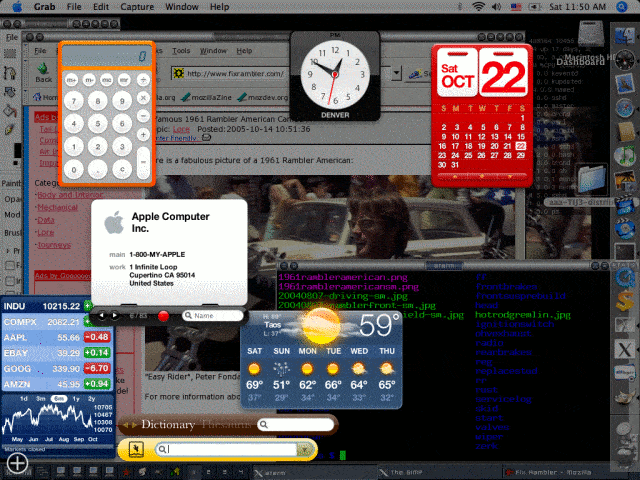
click for larger image.
Some key issues that I solved that are visible above:
The clipboard works seamlessly X style between the browser and the terminals.
The terminal is fairly customizeable.
I don’t lose Mac OS functionality. X11 and Tiger’s version coexist.
I get desktop paging.
I get a simpler launch.
I have The Gimp.
My desktop background includes dynamic stats. I parse logs and gather the stats, convert them to an image, and use the slideshow background feature that simply toggles between two backgrounds. On my old system I just used Esetroot. Eterm isn’t friendly to OS X. For that matter, it has always been a bit of a pain to get Eterm compiled anyway. Aterm went well. Of course, I’m cheating a bit because fink supports Aterm, but not Eterm. I imagine when fink supports Eterm for 10.4, I’ll probably use that. Gnome-terminal is nice as well. The one big feature I like in Gnome-terminal is that it will detect URLs, so I can open up URLs while tailing logs or verifying HTML. Anyway, you can see my dynamic desktop background. I have details on NetAdminTools spread around if you dig and care.
The key software needed was The Gimp, Aterm, IceWM, X11, Mozilla, and IceWM. For X11, I used the version off of the Tiger install CD. I also installed the xcode tools, GCC 4.0, and the X11 SDK, all Apple software. The Gimp was installed from the apple.com site. I did try Darwin Ports and Fink, but this just worked best. Mozilla, IceWM, and Aterm came from fink. To get Aterm looking good, I put this in ~/.Xdefaults:
aterm*loginShell:true aterm*termName:xterm aterm*transparent:false aterm*background:Black aterm*foreground:Green aterm*scrollBar:true aterm*scrollBar_right:true aterm*transpscrollbar:false aterm*saveLines:32767 aterm*font:*-*-fixed-medium-r-normal--*-140-*-*-*-*-iso8859-1 aterm*boldFont:*-*-fixed-bold-r-normal--*-*-140-*-*-*-*-iso8859-1 |
The xterm entry makes sure you get the correct colors and other term features while in programs like vim, since aterm isn’t widely recognized. My changes to .icewm/preferences:
SupportSemitransparency=0 TaskBarShowClock=0 Theme="Infadel2/Overloaded.theme" |
My changes to .icewm/toolbar:
prog aterm xterm /sw/bin/aterm -geometry 80x30+0+25 prog aterm xterm /sw/bin/aterm -geometry 80x30+250+25 prog aterm xterm /sw/bin/aterm -geometry 80x30+0+250 prog aterm xterm /sw/bin/aterm -geometry 80x30+250+250 prog Mozilla mozilla /sw/bin/mozilla prog Email email /sw/bin/mozilla -email prog Gimp gimp "/Applications/Gimp.app/Contents/Mac OS/Gimp" prog xfig xfig /sw/bin/xfig -nosplash -geom 900x680+0+25 -but_per_row 3 |
And, here is my ~/.xinitrc file:
source /sw/bin/init.sh exec /sw/bin/icewm |
BTW, the option key is center button emulation, and the apple key is the right button emulation when you push the key and click. To copy, just highlight, to paste, option/click.
[Note: on May 9, 2006, it seems that the fink install of aterm is weird. I tried a variety of methods including source; however, the best way to get it runnin g was simply to do this from scratch with the source from here]




